
If you want to improve a website’s SEO, the first step is not always publishing another article or adding more keywords. First, you need to understand what is happening on the website.
Are your important pages indexed? Are there broken links? Are your titles and meta descriptions useful? Is your website slow? Can search engines crawl your pages? Which queries are already bringing visitors? Are technical problems preventing good content from performing?
The good news is that you can answer many of these questions without paying for expensive SEO software.
The important part is choosing the right SEO tools for website analysis. No single tool gives you a complete picture. Google Search Console is excellent for Google Search performance and indexing, PageSpeed Insights focuses on performance, and Screaming Frog is useful for technical crawling, while platforms such as Ahrefs and Semrush provide broader SEO analysis.
This guide shows you which tools to use, what each one checks, and how to perform a practical website SEO audit with a free or low-cost tool stack.
What Is a Website SEO Audit?
A website SEO audit is a systematic check of the factors that can affect how easily search engines can crawl, understand, index, and display your website.
A useful audit normally examines:
- Crawling and indexability
- XML sitemap and robots.txt
- Titles and meta descriptions
- Headings and on-page elements
- Canonical URLs
- Broken links and redirects
- Internal linking
- Images and alt text
- Page speed and Core Web Vitals
- Structured data
- Mobile experience
- Content quality
- Search performance
- Backlinks and external authority
An audit does not guarantee higher Google rankings. A technical score is only a diagnostic tool. Google also evaluates relevance, content quality, user experience, links and many other signals.
Google specifically advises site owners to focus on helpful, reliable, people-first content rather than creating content primarily to manipulate search rankings.
What Are the Best SEO Tools for Website Analysis?
There is no single “best” SEO tool for every job. The best choice depends on what you are trying to find.
| Tool | Best for | Free access | Best for beginners? |
|---|---|---|---|
| Google Search Console | Search performance and indexing | Yes | Yes |
| Google PageSpeed Insights | Speed and Core Web Vitals | Yes | Yes |
| Screaming Frog SEO Spider | Technical crawling | Yes, up to 500 URLs per crawl | Moderate |
| Ahrefs | Site audit, backlinks and SEO research | Yes, with limits for verified sites | Yes–Moderate |
| Semrush | Broader SEO auditing and research | Free checker with limitations | Moderate |
| Rank Math | On-page WordPress SEO | Free version available | Yes |
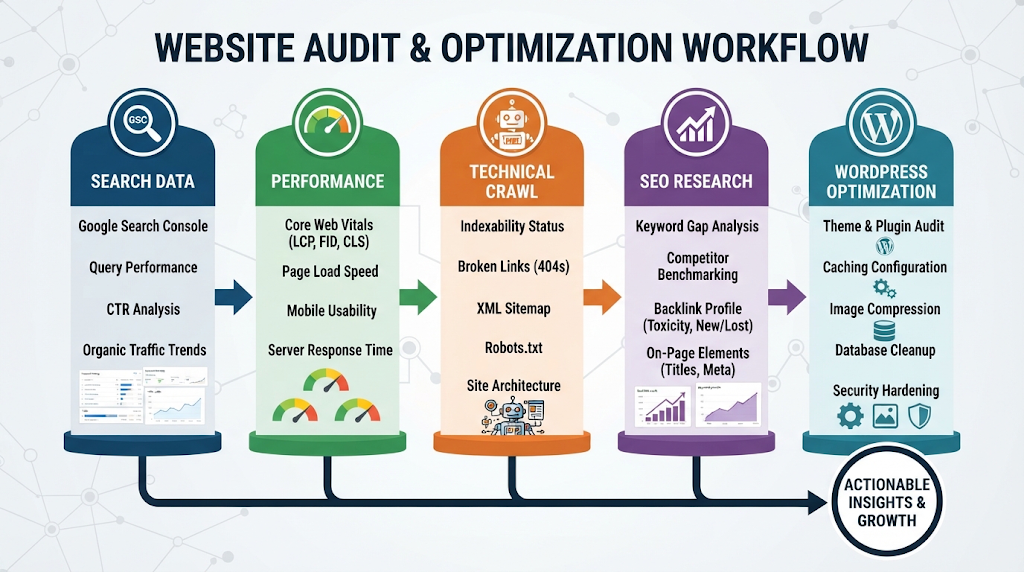
The important distinction is that these tools are not interchangeable.
For example, Google Search Console is not a replacement for a technical crawler, and an SEO plugin is not a replacement for Search Console.
Think of your tools as different inspection instruments rather than competitors.
The Best Free SEO Audit Stack for Beginners
If your budget is $0, start with a small collection of tools instead of trying dozens of SEO checkers.
1. Google Search Console—Search and indexing data
Google Search Console should be one of the first tools connected to your website.
Its Performance report shows metrics such as clicks, impressions, click-through rate (CTR), and average position. You can also break the data down by queries, pages, countries, devices and search appearance.
Use it to answer questions such as:
- Which pages are getting Google traffic?
- Which queries are showing my pages?
- Which pages receive impressions but few clicks?
- Are important pages indexed?
- Are there indexing problems?
- Which countries and devices generate search visibility?
One important point: Search Console tells you a lot about Google Search, but it does not crawl every aspect of your website like a dedicated SEO spider.
2. Google PageSpeed Insights — Performance
Use PageSpeed Insights when you want to investigate page performance and Core Web Vitals.
It is particularly useful for checking whether important pages provide a good experience on mobile and desktop.
Do not make the mistake of treating a perfect performance score as the goal of SEO.
Google says Core Web Vitals are part of its page-experience considerations, but also makes clear that good scores alone do not guarantee top search rankings.
The practical goal is a fast, usable website—not a perfect number that looks impressive in a screenshot.
3. Screaming Frog SEO Spider — Technical crawling
Screaming Frog is especially useful when you need to inspect many URLs at once.
Its free version currently allows crawling up to 500 URLs per crawl. It can help identify broken links, redirects, page titles, metadata, robots directives, duplicate pages and other technical issues.
A beginner-friendly workflow is:
Process / flow:
Crawl → Find errors → Check 404s → Review titles/meta → Inspect indexability → Check redirects → Review internal links → Fix → Crawl again
The interface can feel technical at first, but it becomes much easier once you understand what each report is trying to tell you.
4. Ahrefs — Broader SEO analysis
Ahrefs is useful when you want to move beyond basic technical auditing into backlinks, keywords and broader SEO research.
Its current free account provides Site Audit for verified websites with 5,000 crawl credits per project per month. Some other Ahrefs features also have free limits.
This makes it useful for website owners who want a deeper audit without immediately purchasing a full subscription.
Remember that “free” does not mean unlimited. Always check the current limits before planning an audit around a particular tool.
5. Semrush — Quick SEO health analysis
Semrush’s current free SEO Checker can provide an SEO health score, technical and on-page findings, page-speed and mobile findings, and prioritized recommendations. Its full Site Audit platform provides deeper site-wide crawling and monitoring.
Semrush is particularly useful when you eventually want to combine technical SEO with keyword research, competitor analysis, and broader SEO reporting.
6. Rank Math — WordPress on-page SEO
If you run a WordPress website, an SEO plugin such as Rank Math can help you manage on-page elements directly inside WordPress.
It can be useful for tasks such as:
- SEO titles
- Meta descriptions
- Focus keywords
- Schema configuration
- XML sitemap settings
- Basic on-page recommendations
But remember the distinction:
Rank Math helps you optimize pages inside WordPress. Search Console tells you what Google is seeing and how your site is performing in Google Search.
Using both can be much more useful than relying on either one alone.
What Should an SEO Website Analysis Check?
A useful SEO audit should not stop at a single health score.
1. Indexing and crawlability
First ask:
Can search engines access and index the pages that matter?
Check for:
- Accidental
noindexdirectives - Blocked pages
- Incorrect canonical URLs
- Crawl problems
- Important pages missing from Google’s index
For a new or recently changed website, this should be one of your highest priorities.
2. XML sitemap and robots.txt
Your XML sitemap helps search engines discover important URLs, while robots.txt can control crawler access to certain areas.
Check that:
- The sitemap exists
- It contains appropriate URLs
- Important pages are not accidentally excluded
- Robots.txt is not blocking resources or pages you want crawled
A sitemap does not automatically make a page rank or become indexed. It is part of the technical foundation.
3. Title tags and meta descriptions
Review your important pages for:
- Descriptive titles
- Clear search intent
- Unique titles and useful
- meta descriptions
- Avoiding unnecessary repetition
Do not write titles simply to insert keywords. A good title should help the searcher understand why the page is relevant.
4. Headings and content structure
Check whether each page has a clear main topic and logical heading hierarchy.
Example:
H1: SEO Tools for Website Analysis
H2: Best Free SEO Audit Tools
H3: Google Search Console
This makes the page easier for visitors to scan and helps communicate its structure.
5. Canonical URLs
Canonical tags help communicate which URL should be treated as the preferred version when similar or duplicate URLs exist.
During an audit, look for:
- Missing canonicals where they are needed
- Incorrect canonical destinations
- Canonicals pointing to unrelated pages
- Important pages canonicalized elsewhere accidentally
6. Broken links and redirects
Broken internal links create poor user experiences and can make website maintenance harder.
Look for:
- Broken internal
- 404 pages
- links Redirect chains
- Links pointing to outdated URLs
- Redirect loops
Fix important internal links first rather than trying to eliminate every harmless technical warning immediately.
7. Internal linking
Internal links connect related pages on your own website.
Good internal linking helps users discover related information and gives search engines additional context about the relationships between pages.
Internal link placement:
For example, an article about SEO tools could naturally link to a detailed guide about low-competition keyword research.
8. Images
Check important images for:
- Descriptive filenames
- Useful alt text
- Appropriate dimensions
- Compression
- Lazy loading where appropriate
- Relevance to the surrounding content
Alt text should describe the image when the description is useful. It should not be a place to repeat the target keyword unnaturally.
9. Page speed and Core Web Vitals
Performance problems can affect usability, especially on mobile devices.
Check your most important pages rather than testing only the homepage.
Pay attention to:
- Loading performance
- Responsiveness
- Visual stability
- Large images
- Excessive scripts
- Poor caching
- Heavy plugins or third-party resources
Again, do not optimize for a score alone. Optimize for a better experience.
10. Structured data
Structured data can help Google understand certain types of content and can make pages eligible for supported search features.
However, structured data is not a guarantee of a rich result. Google explicitly states that structured-data eligibility does not guarantee that a search feature will appear. [7]
Use structured data because it accurately describes the page—not simply because you want a larger search result.
11. Backlinks and external authority
Technical SEO is only one part of website growth.
For established websites, investigate:
- Which sites link to you
- Which pages attract links
- Whether important pages have external references
- Which competitors have stronger link profiles
- Whether there are realistic opportunities for earning relevant links
This is where tools such as Ahrefs and Semrush become more useful than a basic technical checker.
12. Content quality
Finally, ask the most important question:
Does this page actually solve the visitor’s problem better than the alternatives?
Check whether the content is:
- Accurate Original
- Up to date
- Easy to understand
- Complete enough for its purpose
- Written for people rather than search engines
Technical SEO cannot rescue content that does not satisfy the searcher’s needs.
How to Audit Your Website for Free: 10 Steps
You do not need to fix everything at once. Follow this order.
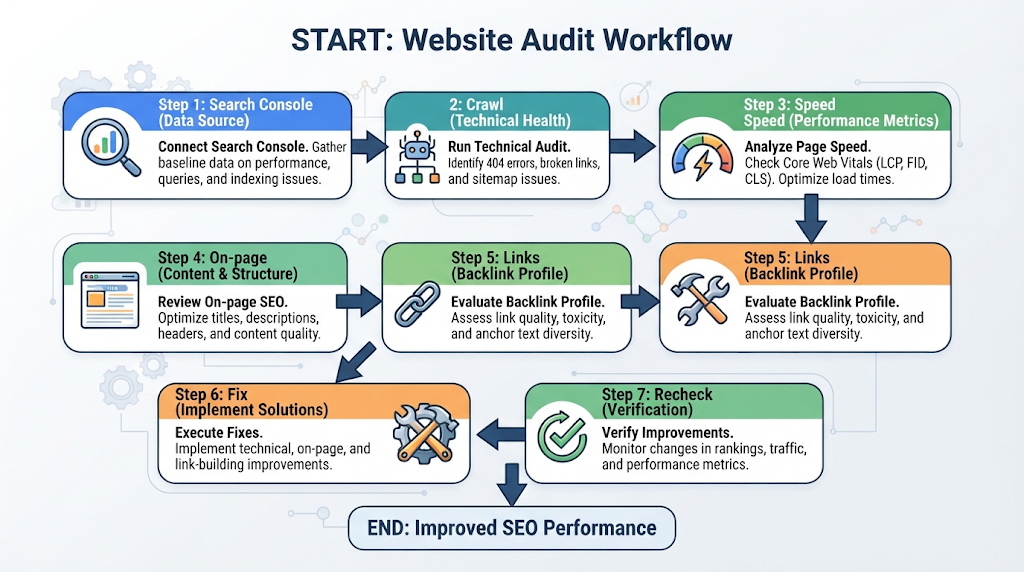
Step 1: Connect Google Search Console
Verify your website and open the Performance and indexing reports.
Start by understanding what Google already knows about your website.
Step 2: Check important pages for indexing
Identify your homepage, major category pages and important articles.
Use Search Console’s indexing and URL inspection features to investigate pages that should be indexed but are not.
Step 3: Crawl your website
Use Screaming Frog or another crawler.
If your website is small, the free 500-URL Screaming Frog limit may be enough for an initial technical crawl. [4]
Step 4: Fix critical technical problems
Prioritize:
- Important pages blocked from crawling
- Incorrect
noindex - Serious indexing problems
- Broken important URLs
- Incorrect redirects
- Incorrect canonicals
Do not spend an hour fixing a minor warning while an important article is accidentally marked noindex.
Step 5: Check page speed
Run important pages through PageSpeed Insights.
Start with pages that receive traffic or are important for your business.
Step 6: Review on-page SEO
Check:
- Titles
- Meta descriptions
- H1/H2 structure
- Content relevance
- Image alt text
- Internal links
Step 7: Check Search Console performance
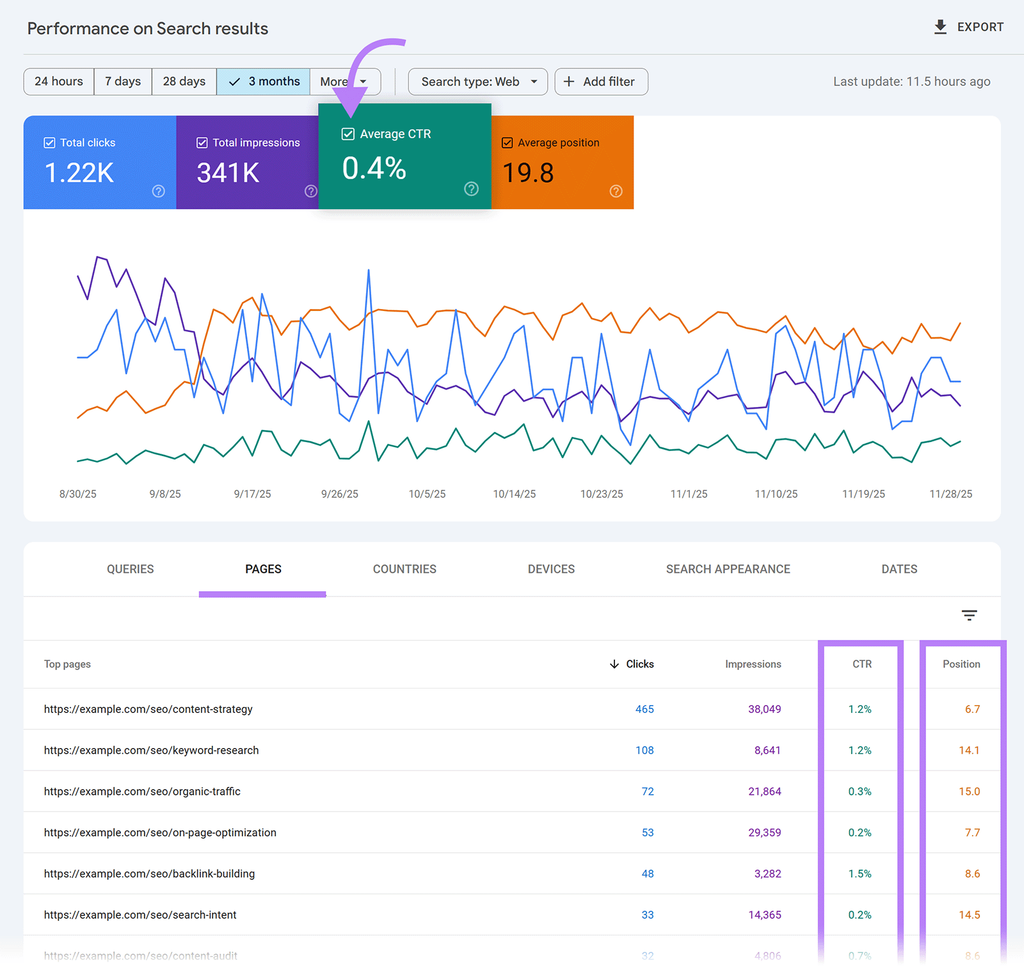
Look for pages with:
High impressions + low CTR
These can sometimes indicate opportunities to improve the title and search-result presentation.
Also look for pages ranking around the middle of the results where better content, stronger internal linking or improved relevance may provide an opportunity.
Step 8: Review backlinks and competitors
Once the technical foundation is healthy, use Ahrefs, Semrush or another suitable platform to investigate competitors and backlinks.
Do not copy competitor content. Look for topics, questions and useful information they cover that your audience also needs.
Step 9: Create a priority list
Use a simple system:
Critical → High → Medium → Low
| Problem | Priority |
|---|---|
| Important page accidentally noindexed | Critical |
| Key page returns 404 | High |
| Important page has poor title | High |
| Large uncompressed image | Medium |
| Minor metadata warning on an unimportant page | Low |
Step 10: Fix and re-audit
An audit is not finished when you download the report.
After making changes, check the affected pages again.
Then compare your Search Console performance over time.
Which SEO Tool Should You Use?
The easiest way to choose is by the problem you need to solve.
- I have no budget: Use Google Search Console + PageSpeed Insights + Screaming Frog.
- I run a WordPress website: Use Search Console + your SEO plugin + a technical crawler.
- I need to find technical problems across many pages: Use Screaming Frog or a site-audit platform. I need backlink and competitor research: Use Ahrefs or Semrush.
- I want a quick website health check: Use a reputable online SEO checker, but treat its score as a starting point rather than a final SEO verdict.
- I manage a larger website: Consider a professional crawling and SEO platform with scheduled audits and broader reporting.
Free vs. Paid SEO Tools: Do You Need to Pay?
Not necessarily.
A small website can accomplish a surprising amount with free tools.
Paid software becomes more valuable when you need:
- Larger crawls
- Historical data
- More keyword research
- Competitor analysis
- Large backlink databases
- Automated reporting
- Scheduled audits
- Team workflows
- Advanced exports
The right question is not:
“Which is the most expensive SEO tool?”
It is:
“Which problem am I trying to solve, and which tool gives me the data I need?”
For many beginners, paying for a large SEO platform before understanding the basics simply creates more reports to look at without knowing what to do with them.
SEO Tools, AEO and GEO: Does Website Analysis Still Matter?
Yes.
Search is changing, but the technical foundation has not disappeared.
Google’s current guidance for generative AI search says that established SEO practices remain relevant because AI search experiences are built on Google’s broader search and quality systems. Google also emphasizes making pages accessible to crawling and indexing. [8]
That means your website still needs:
- Crawlable pages
- Indexable content
- Clear site structure
- Useful internal links
- Strong, helpful content
- Good page experience
- Accurate structured data where appropriate
For AEO, make important answers clear and direct.
For GEO, make relationships between entities and concepts understandable and support important factual claims with trustworthy sources.
Do not chase “AI optimization hacks.”
A technically accessible website with useful, original content gives search engines—and AI-powered search experiences—a much better foundation to understand your information.
How Often Should You Audit a Website
There is no universal rule that every website needs a full audit every week.
A practical schedule is:
Small website:
Run a deeper audit every few months and monitor Search Console regularly.
Active content website:
Perform periodic technical checks and review performance as new content is published.
Large or frequently changing website:
Use more frequent automated crawling and monitoring.
Also run an additional audit after major changes such as:
- Website migration
- URL restructuring
- Theme changes
- Large plugin changes
- Major content restructuring
- Domain changes
- Significant technical changes
The more frequently your website changes, the more useful ongoing monitoring becomes.
Frequently Asked Questions
1.What are the best free SEO audit tools?
Google Search Console, PageSpeed Insights and Screaming Frog are strong starting points. Ahrefs also provides free Site Audit access for verified websites with usage limits, while Semrush offers a free SEO Checker with a more limited snapshot.
2. Can I analyze my website for SEO for free?
Yes. You can perform a useful basic audit without paying for an SEO platform. Combine Search Console for search and indexing information, PageSpeed Insights for performance, and a crawler such as Screaming Frog for technical analysis.
3. Is Google Search Console enough for SEO?
No. Search Console is essential, but it does not replace every type of SEO analysis. It provides valuable Google Search performance and indexing information, while crawlers, speed tools and backlink platforms answer different questions.
4.What does an SEO audit check?
A comprehensive audit can check crawling, indexing, sitemap, robots.txt, titles, meta descriptions, headings, canonicals, links, redirects, images, structured data, page performance, content and backlinks.
5. Do SEO tools guarantee better rankings?
No. SEO tools identify problems and opportunities; they do not guarantee rankings. Even Google notes that good technical or page-experience results do not guarantee top search positions. [3]
6. Do I need Ahrefs or Semrush as a beginner?
Not necessarily. Start with free tools and learn how to interpret the data. Paid platforms become more useful when you need deeper competitor, keyword, backlink or reporting capabilities.
7. What should I fix first after an SEO audit?
Start with problems that prevent important pages from being crawled or indexed. Then address broken important URLs, redirects, canonicals and major performance issues before moving to lower-priority optimization.
8. How often should I perform an SEO audit?
The ideal frequency depends on the size and activity of your website. Small websites can perform deeper audits periodically, while larger or frequently changing sites benefit from more regular automated monitoring.
Final Takeaway
The best SEO audit is not the one that produces the biggest score.
It is the one that helps you answer six practical questions:
Question list:
- What is wrong?
- Why does it matter?
- Which tool confirms the problem?
- What should I fix first?
- Did the fix work?
- What should I monitor next?
For a beginner with no budget, start with Google Search Console, PageSpeed Insights and Screaming Frog. Add a WordPress SEO plugin if you use WordPress, and consider Ahrefs or Semrush when you need deeper competitor, keyword or backlink research.
Most importantly, don’t try to fix every warning at once. Focus on the problems that affect important pages and the experience of real visitors.
That approach turns website analysis from a confusing collection of SEO scores into a practical improvement process.
Pingback: How to Optimize Blog Posts for Google AI Overviews: 9 Steps