
Google AI Overviews SEO: get cited in AI overviews
By · ntechsansar: 27 October 2026
Google now answers many questions at the top of the results page, and fewer people click the links underneath. If you publish blog posts, the question is no longer only “how do I rank?” It is also “how do I get cited in the answer?”
To optimize blog posts for Google AI Overviews, make sure each post is indexed and allowed to show a snippet. Answer its main question in plain words near the top. Cover the follow-up questions readers have. Add something original that a summary can’t copy. Google says no special markup or extra requirements apply, and appearing is never guaranteed. So this is good SEO done carefully, not a trick.
This guide covers what AI Overviews are, how Google picks sources, and nine steps you can apply to a post today. It also covers common mistakes and how to measure results
What Are Google AI Overviews, and Why Do They Matter for Bloggers?
Google AI Overviews are AI-generated summaries shown above some search results, with links to pages that support the answer. They matter because they can answer a query on the results page, so your post may be seen without being clicked.
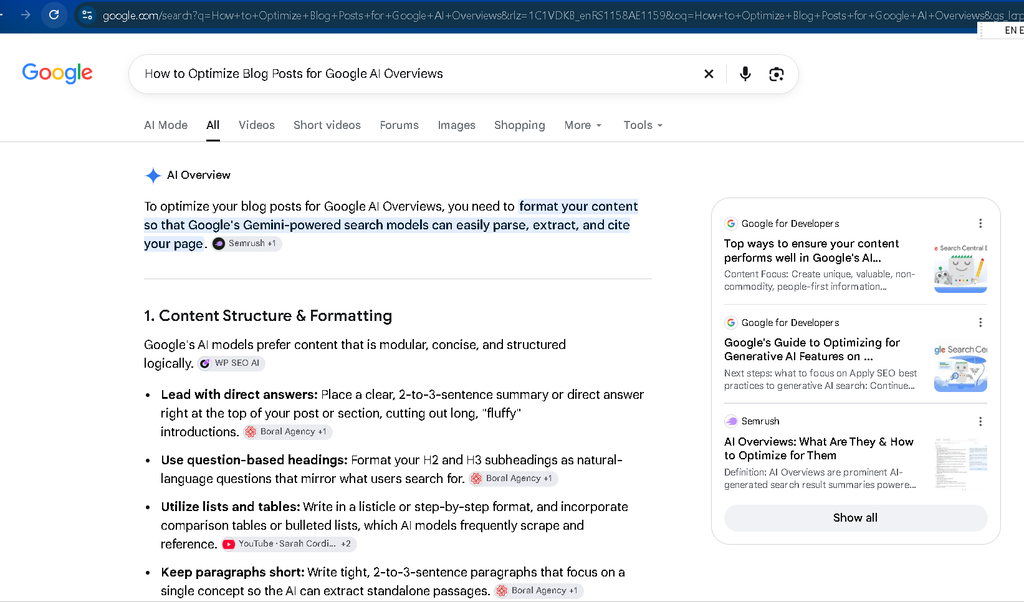
How do AI overviews work
According to Google’s guide to generative AI features, two techniques matter most:
- Grounding (retrieval-augmented generation). The AI pulls relevant, up-to-date pages from Google’s Search index. It reads them to write the answer and shows links to supporting pages.
- Query fan-out. The system runs several related searches at once. Google’s example: a question about fixing a lawn full of weeds can also trigger searches on herbicides, removing weeds without chemicals, and preventing weeds.
Fan-out explains something useful. Your post can be cited for a narrow sub-question it answers well, even if it isn’t the top result for the broad query.
Google also says AI Overviews appear only when its systems judge them additive to classic Search, so they often don’t trigger. AI Mode is a separate experience that may use different models and show different links.
Do AI Overviews reduce clicks?
Usually, yes. The size varies by study and by query.
- Pew Research Center tracked the browsing of 900 US adults in March 2025. People clicked a regular result in 8% of visits with an AI summary versus 15% without. They clicked a link inside the summary in 1% of visits. Google disputed the study’s methodology.
- Google’s position is that clicks from pages with AI overviews are higher quality, meaning people spend more time on the site. That is Google’s own claim, so check your analytics before relying on it.
Being cited vs. ranking: why both matter
Seer Interactive’s data, covering 53 brands and 5.47 million queries from January 2025 to February 2026 and reported by Search Engine Land, compares click-through rates:
| Situation | Approx. CTR |
|---|---|
| No AI Overview | 3.3% |
| AI Overview, your page cited | 2.1% |
| AI Overview, your page not cited | 0.9% |
Being cited does not restore the old click rate. It does roughly double clicks compared with being listed but uncited. That is the practical reason to care about citations.
How Does Google Choose Sources for AI Overviews?
Google has not published a ranking-factor list for AI Overviews. Its documentation says a page must be indexed and eligible to show a snippet. It adds that its generative AI features are rooted in the same core ranking and quality systems as regular Search.
Three things are confirmed in Google’s current guidance:
- The page is indexed and can show a snippet.
- Your site is included in Search generative AI features in Search Console. Site owners can now opt out, and excluded sites lose that visibility.
- The content is helpful, reliable and people-first.
Rankings help, but they are no longer a safe predictor. Ahrefs analyzed 863,000 keywords and found that 38% of cited pages ranked in the top 10 for the same query, versus 76% in its July 2025 study. Ahrefs notes that improved citation detection means the two datasets aren’t directly comparable. A separate BrightEdge analysis reported about 17% overlap, using different methods.
The takeaway: rank for your topic, but also answer the sub-questions around it well. Google’s documentation doesn’t say fan-out explains every citation, so treat that as a plausible explanation, not a rule.
9 Steps to Optimize Blog Posts for Google AI Overview
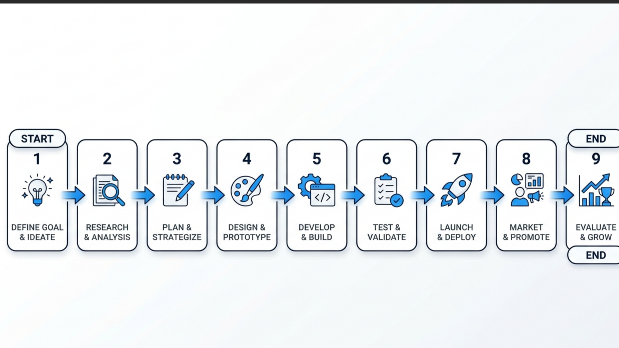
Step 1: Target question-based queries
Start with the questions readers actually type:
- Check People Also Ask boxes for your topic.
- Use a tool like AlsoAsked to see how related questions connect.
- In Search Console’s Performance report, filter queries with a regex such as
^(how|what|why|can|does|is).
Pew found that only 8% of one- or two-word searches produced an AI summary, so longer, conversational questions deserve attention. Turn the best ones into H2 or H3 headings, worded the way a person would ask them.
Don’t create a separate page for every phrasing. Google’s guide says doing that mainly to manipulate results can violate its scaled content abuse policy.
Step 2: Lead with a direct answer
Under each question heading, answer in the first sentence or two, then expand. About 40–60 words reads well. Google’s documentation doesn’t set that length. It is a writing habit that helps readers and keeps passages quotable.
Here is an example for the heading “What is query fan-out?”:
| Text | |
|---|---|
| Before | “Query fan-out has become important as search has evolved, and there are many aspects to consider when thinking about how it works.” |
| After | “Query fan-out is a technique where Google runs several related searches at once to build an AI answer. A question about fixing a weedy lawn, for example, can also trigger searches on herbicides, chemical-free removal and prevention.” |
The second version answers the question and can be quoted as written. The first says nothing.
Step 3: Use clear, scannable structure.
Use one H1, H2s for main questions, and H3s for sub-points. Keep paragraphs short. Use numbered lists for steps and tables for comparisons.
Do this for readers. Google’s guide says you don’t need to break content into tiny pieces for AI and that there is no ideal page length.
Step 4: Show first-hand experience and expertise (E-E-A-T)
Google’s helpful content guidance raises questions of experience, expertise, authoritativeness, and trust, known as E-E-A-T. In practice:
- Show a real author name and a short bio with relevant background.
- Use original screenshots from tools you actually used.
- Share results you measured yourself, with dates and a note on how you measured them.
- Cite primary sources for facts.
If you haven’t tested something yourself, say so. Don’t imply you did.
Step 5: Add structured data, with realistic expectations.
Add Article markup with author and dates, plus organization or person details. Most SEO plugins, including Rank Math, can generate these. FAQPage markup suits only pages with real, visible questions and answers.
Be clear about what this does. Google says structured data isn’t required for AI features and there is no special schema for them. It still helps Google understand your page and can support rich results. The markup must match the visible text.
Step 6: Cover the topic completely.
Because Google fans out into related searches, a post that answers the obvious follow-ups has more chances to be cited. After writing your main answer, list the questions a reader would ask next. Give each one a short section.
Keep related answers on one page and don’t pad. A good test: would a reader still need another search after your post?
Step 7: Keep content fresh and accurate
Google says grounding exists to improve the quality, accuracy and freshness of AI responses. Review posts about tools, statistics or Google features first, because they go stale fastest.
- Update numbers and replace dead links.
- Remove claims that no longer hold.
- Show an updated date only when you changed something meaningful.
Step 8: Fix the technical basics
Technical eligibility comes first. A page Google can’t quote can’t be cited.
- Indexing: run the URL Inspection tool in Search Console on important posts.
- Crawling: make sure robots.txt and any CDN or firewall allow Googlebot.
- Snippet controls: check for
nosnippet,data-nosnippetor a very lowmax-snippeton content you want quoted. These limit what Google shows. - AI feature setting: confirm your site isn’t excluded from generative AI features in Search Console.
- Text content: keep important information as text, not only inside images.
- Page experience: check mobile usability and Core Web Vitals.
- Internal links: make sure the post is linked from related pages.
For a full site check, read the SEO website audit guide.
Step 9: Add original value
Google’s guide separates commodity content from non-commodity content. A post like “7 Tips for First-Time Homebuyers” repeats common knowledge. A first-hand account of a specific decision gives readers something new.
For a blog, that can mean:
- your own data or a documented process,
- a case study,
- a clear opinion with reasons,
- a comparison you built yourself.
Be realistic about clicks. Since links inside AI summaries are rarely clicked, the goal is to be worth the click when it happens, and worth being named.
Common Mistakes to Avoid
- Publishing generic AI-written content with no original input. Google doesn’t ban AI tools. It says AI-assisted work must still meet its Search Essentials and spam policies.
- Keyword stuffing or “answer-only” posts. A one-paragraph answer with no depth gives readers and Google little to trust.
- Ignoring author credibility. An anonymous post on a topic that calls for experience is a weak signal.
- Chasing hacks that promise guaranteed inclusion. Google’s guide lists several you can ignore:
| Tactic | Google’s position |
|---|---|
| llms.txt and similar AI files | Google Search doesn’t use them; they neither help nor harm. See llms.txt explained |
| “Chunking” content into tiny pieces | Not required |
| Special schema for AI features | None needed |
| Rewriting content just for AI | Not necessary |
| Seeking inauthentic mentions | Not as helpful as it seems |
How to Track Whether Your Posts Appear in AI Overviews
The most direct tool is Search Console’s Generative AI performance report. It shows impressions, not clicks.
Google Search Console
Google’s help page says the report shows impressions in AI Overviews and AI Mode. You can group them by pages, countries, devices and dates, and filter by text-based or multimodal search. As of 31 August 2026, it is available to all websites worldwide.
Its limits matter. The documentation lists impressions but no click or query data, so you can’t calculate AI-specific click-through rate from this report. If you don’t see it, your site may not have enough generative AI impressions, or it may be excluded from those features.
Manual SERP checks in the US and EU
AI Overviews don’t appear on every query or in every region. Search your target questions in a private browser window and note whether an Overview appears and who is cited. Repeat from a US location and an EU location, with a colleague or a VPN.
One vendor study (Peec, April 2026) reported AI Overviews appearing less often in EU searches than in the US, and not at all in France. Treat that as a reason to check your own markets, not as a confirmed fact.
Third-party tools
Some SEO platforms, such as Semrush and Ahrefs, offer AI visibility tracking. Check their current features first. Google’s guide warns that no third-party tool has access to its internal ranking or AI systems.
A simple tracking sheet
| Keyword/question | AI Overview shown? | Cited? | Region | Date | URL |
|---|---|---|---|---|---|
| Yes / No | Yes / No | US / EU |
Quick Checklist
Copy this for each post:
- ☐ Page is indexed (URL Inspection)
- ☐ Googlebot isn’t blocked; no restrictive snippet controls
- ☐ Site is included in Search generative AI features
- ☐ Main question is a heading, with a direct answer beneath it
- ☐ Follow-up questions are covered on the same page
- ☐ Headings, short paragraphs, lists or tables used where useful
- ☐ Author name and bio are visible
- ☐ Facts link to primary sources
- ☐ Article markup matches visible content
- ☐ Something original is included (data, case, opinion, process)
- ☐ Updated date reflects a real update
FAQ
- Can you force your content into Google AI Overviews?
No. Google says there are no additional requirements or special optimizations for AI Overviews, and that indexing and serving are never guaranteed. You can make a page eligible and genuinely useful, but inclusion is Google’s decision.
2. Do AI Overviews reduce blog traffic?Studies suggest they can reduce clicks. Pew Research found people clicked a regular result in 8% of visits with an AI summary versus 15% without, though Google has disputed that study’s methodology. Seer Interactive’s data shows cited pages get more clicks than uncited ones on similar results pages. Effects vary by query.
3. Is optimizing for AI Overviews different from regular SEO?
Mostly not. Google says SEO best practices still apply because AI features are rooted in its core ranking and quality systems. What changes is emphasis: answering sub-questions clearly, adding original value, and tracking impressions in the new Search Console report as well as clicks.
4. Does AI-written content get cited?
Reliable public data on this is thin. Google’s position is that content made with AI tools must still meet its Search Essentials and spam policies. It also says unique, first-hand content is likely to matter more than text any model could produce.
5. How long does it take to get cited?
There is no official timeline. Google notes that recrawling a changed page can take anywhere from several days to several months, and a change can’t affect results until the new version is processed. Requesting a recrawl in Search Console may help, but citations are never guaranteed
Conclusion
Getting cited in AI Overviews rests on three things: solid SEO fundamentals, direct answers under question headings, and original value that a summary can’t replace. Nothing here guarantees a citation, but each step makes your post easier to trust and easier to quote.
This week, pick one existing post and run it through the checklist above. Then track it in Search Console .